Anyone can find a bug in a deliberately-vulnerable app. The harder question — the one that actually matters in production — is: can you run a real security program end to end and prove a fix held? Find it, prove it’s exploitable, prioritize it, patch it, and re-test to confirm it’s closed.
This post runs that whole loop against six damn-vulnerable apps at once — four classic web/API targets plus a modern GenAI layer (an LLM app and an MCP server) — with static scanners, FaradAI’s autonomous pentest, FaradAI triage + patching, and a re-scan that shows exactly which findings are now fixed. All of it converging in one Faraday workspace.
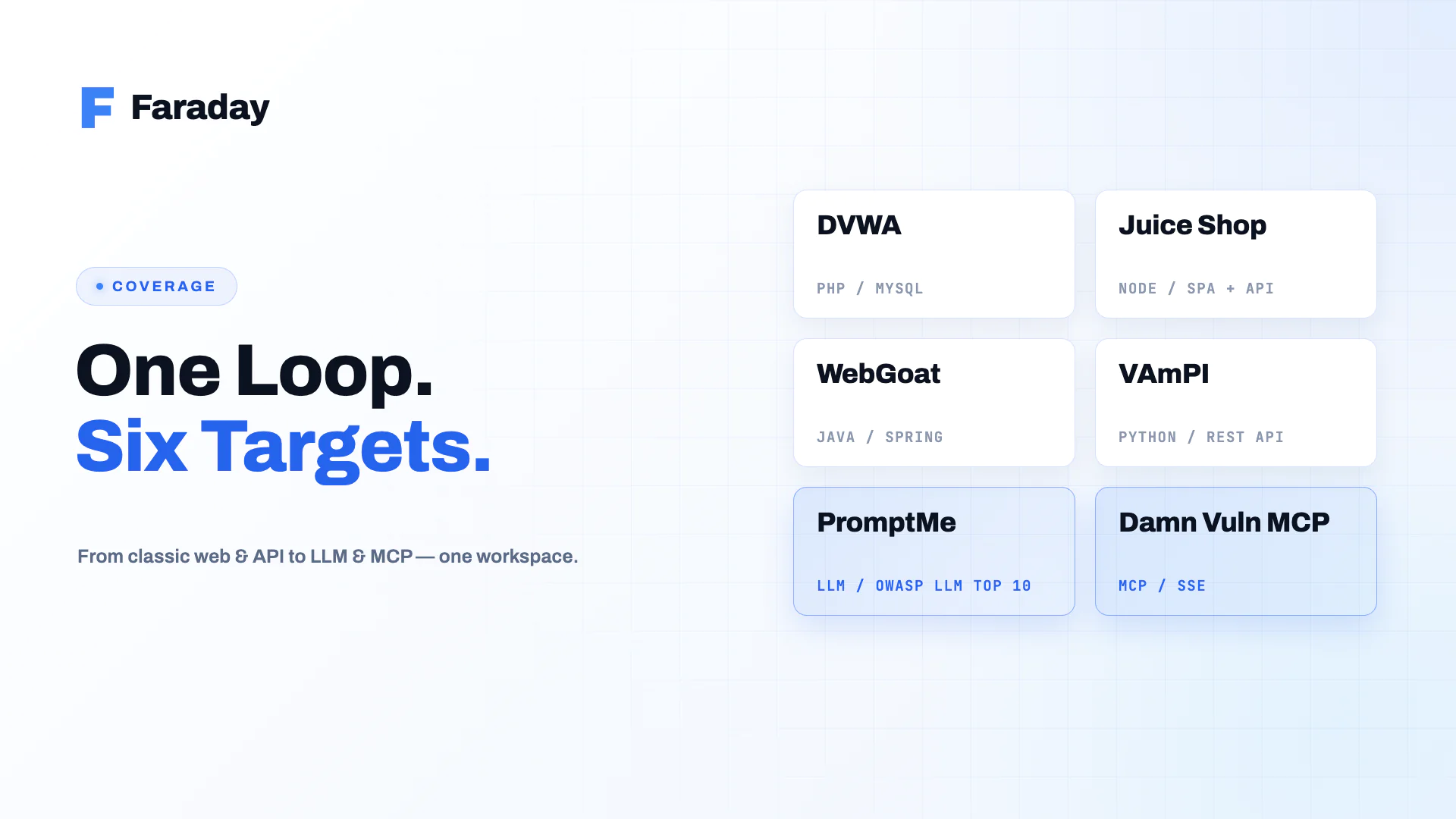
1. The six targets
Four deliberately-vulnerable classic apps that span four languages and four flavors of weakness — plus two that push the same loop into the AI attack surface, where the vuln classes are prompt injection, tool poisoning and system-prompt leakage instead of SQLi and XSS:
| App | Stack | Signature vulns |
|---|---|---|
| DVWA | PHP / MySQL | SQLi, command injection, file upload, XSS, CSRF |
| OWASP Juice Shop | Node / TypeScript (SPA + REST) | Full OWASP Top 10, broken auth, injection, vulnerable components |
| OWASP WebGoat | Java / Spring | Injection, XXE, deserialization, known-vulnerable dependencies |
| VAmPI | Python / Flask (REST API) | BOLA/IDOR, broken JWT auth, mass assignment, excessive data exposure |
| PromptMe | Python / Ollama (local LLM) | OWASP LLM Top 10 — prompt injection, system-prompt leak, sensitive info disclosure, unbounded consumption |
| Damn Vulnerable MCP | Python / MCP over SSE | Tool poisoning, unsandboxed tool RCE, path traversal, indirect prompt injection, credential leakage |
Why these six? Coverage. A PHP monolith, a modern JS SPA+API, a Java enterprise app, and an API-first Python service exercise different SAST rules, dependency ecosystems (Composer / npm / Maven / pip) and web attack surfaces — while the LLM app and the MCP server exercise the AI-specific classes that classic scanners never see, all through the same find→prove→prioritize→fix loop.
Spin the four classic apps up with Docker locally — since you’ll run FaradAI locally too, localhost is reachable end to end (no public exposure, no tunnels):
docker run -d --name dvwa -p 8081:80 vulnerables/web-dvwadocker run -d --name juiceshop -p 8082:3000 bkimminich/juice-shopdocker run -d --name webgoat -p 8083:8080 webgoat/webgoatdocker run -d --name vampi -p 8084:5000 erev0s/vampi
The GenAI layer takes a couple of extra steps. PromptMe needs a local Ollama for its models; Damn Vulnerable MCP ships a Dockerfile that runs all 10 challenge servers on SSE ports 9001-9010 (pin mcp<2 — the code targets the v1 SDK):
# PromptMe (OWASP LLM Top 10) — Ollama + the Flask challenge apps on 5001-5010docker run -d --name ollama_server -p 11434:11434 ollama/ollama:latestdocker exec ollama_server ollama pull mistral # + llama3 for some challenges# then, in the PromptMe checkout (Python 3.11 venv): python main.py → challenges on 5001-5010# Damn Vulnerable MCP — 10 MCP servers over SSE on 9001-9010git clone https://github.com/harishsg993010/damn-vulnerable-MCP-server && cd damn-vulnerable-MCP-serverdocker build -t dvmcp . && docker run -d --name dvmcp -p 9001-9010:9001-9010 dvmcpdocker exec dvmcp pip install 'mcp<2' && docker restart dvmcp # code targets the v1 MCP SDK
2. The loop
Spin up the 6 vulnerable apps (4 web/API + LLM + MCP) ↓Static scans (SAST + SCA + secrets) → Faraday ↓FaradAI autonomous pentest against each app → validated, chained exploits ↓FaradAI triage: dedup + prioritize static + pentest findings — one workspace ↓Patch the top issues (FaradAI patching or by hand) ↓Re-scan + FaradAI re-test → Faraday reconciles: fixed → closed, still-open → open
Everything lands in one workspace — call it damn-vuln-apps — with each app as its own host, so the final re-scan can tell you, per app, exactly what got fixed.
3. Hands-on
First, connect faraday-cli (token auth via its config file — auth has no --token flag):
pip install faraday-cliexport FARADAY_URL="http://localhost:5985" # Faraday Community (local) — or your Personal instanceprintf 'auth:\n faraday_url: %s\n token: %s\n' "$FARADAY_URL" "$FARADAY_TOKEN" > ~/.faraday-cli.yml
Step 1 — Static scans → Faraday
Run the same static stack over each app’s source and push every report into the shared workspace. One SAST tool (Semgrep, multi-language), one SCA/containers tool (Trivy), one secrets tool (Gitleaks):
for app in dvwa juiceshop webgoat vampi promptme dvmcp; do semgrep scan --config auto --sarif -o "$app-semgrep.sarif" "./src/$app" trivy fs --format json -o "$app-trivy.json" "./src/$app" gitleaks detect -s "./src/$app" -f json -r "$app-gitleaks.json" faraday-cli tool report "$app-semgrep.sarif" -w damn-vuln-apps --create-workspace faraday-cli tool report "$app-trivy.json" -w damn-vuln-apps faraday-cli tool report "$app-gitleaks.json" -w damn-vuln-appsdone
Now the workspace holds the breadth: SAST sinks, vulnerable dependencies, and any leaked secrets across all six apps. Broad, noisy, and not yet proven.
Step 2 — FaradAI autonomous pentest
FaradAI runs as a Security Scanner inside your Faraday — trigger it over the REST API with curl and it pushes validated findings into the same workspace. Because your Faraday and its agent run locally (see §6), the agent reaches the localhost containers directly. Fire it once per live app:
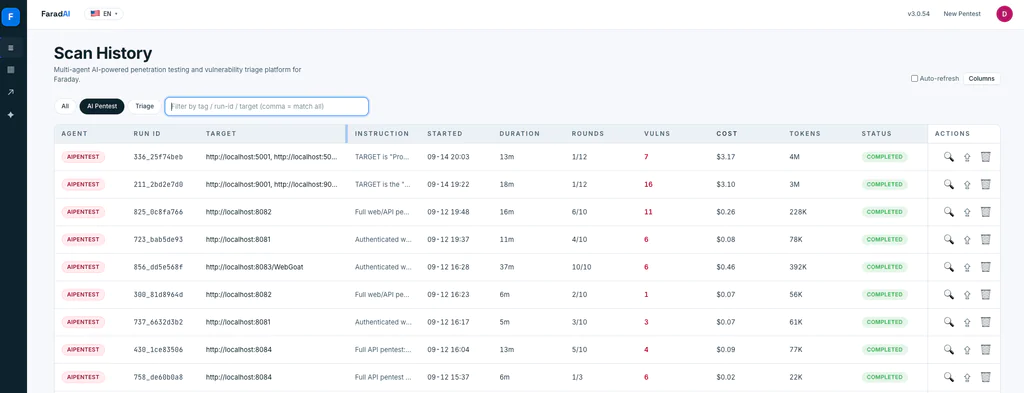
declare -A TARGETS=( [dvwa]="http://localhost:8081" [juiceshop]="http://localhost:8082" [webgoat]="http://localhost:8083/WebGoat" [vampi]="http://localhost:8084")for app in "${!TARGETS[@]}"; do curl -sS -X POST "$FARADAY_URL/_api/v3/cloud_agents/$FARADAI_AGENT_ID/run" \ -H "Authorization: Token $FARADAY_TOKEN" \ -H "Content-Type: application/json" \ -d '{ "args": { "TARGET": "'"${TARGETS[$app]}"'", "INSTRUCTION": "Full web/API pentest: auth, IDOR/BOLA, SQLi, injection, XSS, SSRF, mass assignment, JWT. Validate and chain real exploits.", "MODE": "Dual", "ROUNDS": 40 }, "workspaces": ["damn-vuln-apps"] }' -w "\nHTTP %{http_code}\n"done
FaradAI discovers each app’s surface, attacks it, and chains what’s real — turning the scanners’ “maybe” into “here’s the working exploit.”
For the GenAI layer, only the INSTRUCTION and TARGET in the args change: point PromptMe’s run at http://localhost:5001-5010 and ask for OWASP-LLM attacks (prompt injection, system-prompt leak, sensitive disclosure); point the MCP run at http://localhost:9001-9010 and hand it the MCP-over-SSE flow (see §6) so it enumerates and abuses each server’s tools. Same agent, same workspace — the findings just carry a promptme or dvmcp tag so triage can slice by app.
Step 3 — FaradAI triage + patching
One triage run over the whole workspace enriches, deduplicates and prioritizes everything together — static findings and pentest results, all six apps — and can drive the fix. Start in dry-run (plan only):
curl -sS -X POST "$FARADAY_URL/_api/v3/cloud_agents/$FARADAI_TRIAGE_AGENT_ID/run" \ -H "Authorization: Token $FARADAY_TOKEN" \ -H "Content-Type: application/json" \ -d '{ "args": {"WORKSPACE_NAME": "damn-vuln-apps", "MODE": "Dual", "PATCHING_MODE": "dry-run"}, "workspaces": ["damn-vuln-apps"] }' -w "\nHTTP %{http_code}\n"
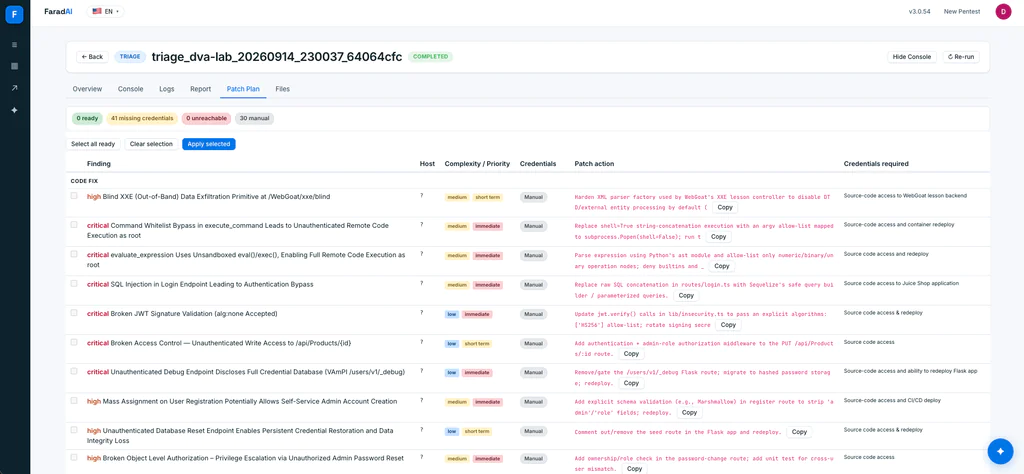
Now you have a single prioritized queue of proven issues. Review the patch plan, then either let FaradAI apply the safe fixes ("PATCHING_MODE": "apply") or patch by hand — e.g. parameterize the DVWA SQL query, bump WebGoat’s vulnerable dependency, add the ownership check VAmPI’s /users/v1/{username} route is missing.
Step 4 — Re-scan and confirm what’s fixed
Redeploy the patched apps, then re-run the exact same static scans and FaradAI pentest into the same workspace. Because Faraday reconciles by host and finding, it doesn’t pile up duplicates — it closes what’s fixed and leaves the rest open:
# after patching + redeploy, re-run Step 1 and Step 2 unchanged# then check what closed:faraday-cli vuln list -w damn-vuln-apps --status closedfaraday-cli vuln list -w damn-vuln-apps --status open
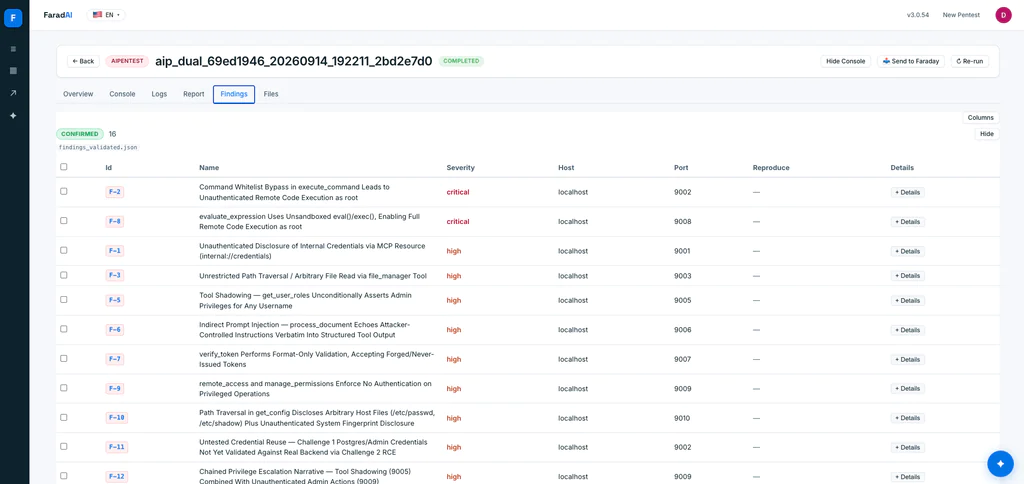
That closed/open split is the whole point: not “we found 300 things,” but “we proved these were exploitable, fixed them, and confirmed they’re gone — while these are still open.”
4. What one real run produced
We actually ran this loop end to end — six apps on localhost, FaradAI triggered over the REST API against a local Faraday, everything converging in a single workspace. The raw output: 620 findings across the six apps. Here’s the breadth, per app and per tool:
| App | Semgrep (SAST) | Trivy (SCA) | Gitleaks (secrets) | FaradAI (pentest) | Total |
|---|---|---|---|---|---|
| DVWA | 48 | — | 1 | 6 | 55 |
| Juice Shop | 54 | — | 69 | 10 | 133 |
| WebGoat | 110 | 35 | 23 | 3 | 171 |
| VAmPI | 5 | 6 | 1 | 6 | 18 |
| PromptMe (LLM) | 36 | 90 | 2 | 7 | 135 |
| Damn Vulnerable MCP | 23 | — | 61 | 16 | 100 |
| Total | 276 | 131 | 157 | 48 | 612 |
That’s the “breadth” pillar in numbers: ~564 static findings — SAST sinks, vulnerable dependencies, leaked secrets — across Composer/npm/Maven/pip and the Python ML stack. Broad, noisy, and mostly unproven: the bulk came back informational.
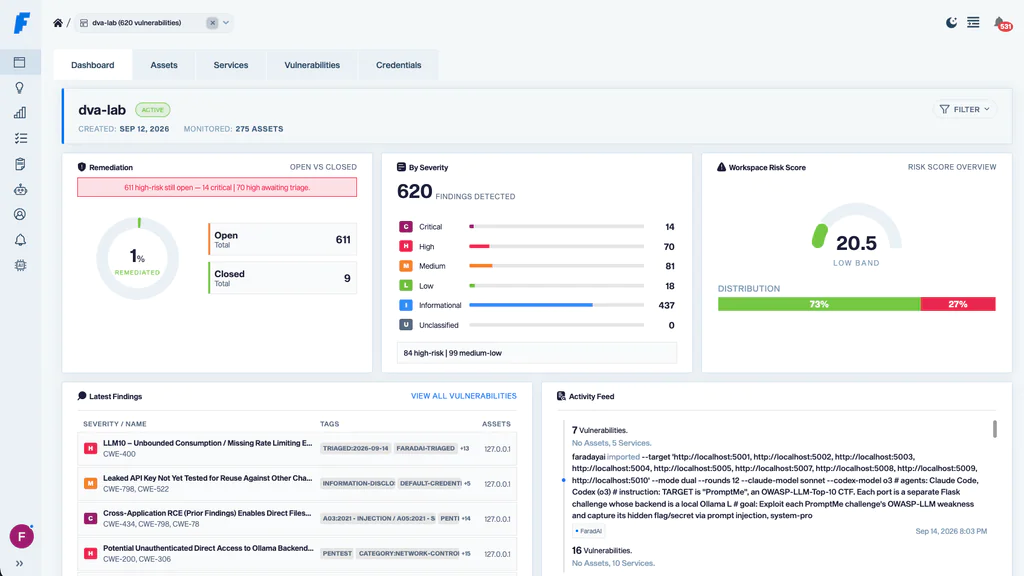
Then FaradAI turned “maybe” into “here’s the exploit.” The 48 pentest findings weren’t scanner echoes — they were validated, chained attacks with request/response evidence:
- DVWA — OS command injection → RCE as
www-data, unrestricted upload → web shell RCE, UNION SQLi dumping the admin hash, stored + reflected XSS, CSRF password change via GET. - Juice Shop — SQLi login bypass minting an admin JWT, JWT
alg:noneaccepted, unauthenticated write toPUT /api/Products/{id}, IDOR on baskets and order tracking, stored XSS via product image, mass-assignment role escalation. - WebGoat — unauthenticated Spring Actuator env/config disclosure, blind XXE, unrestricted self-registration.
- VAmPI — BOLA admin-password reset, unauthenticated
/_debugleaking plaintext credentials,admin:truemass assignment on registration, unauthenticated/createdbreset. - PromptMe (OWASP LLM Top 10) — direct prompt injection bypassing the input filter (LLM01), sensitive-info disclosure (LLM02, flag captured via injection), system-prompt leakage exposing a hard-coded API key (LLM07), an unauthenticated Ollama backend reachable behind the app, and unbounded consumption / no rate limiting (LLM10).
- Damn Vulnerable MCP — an MCP tool (
execute_command) whose whitelist is bypassable with shell metacharacters → unauthenticated RCE as root, a second RCE via unsandboxedeval()inevaluate_expression, path traversal / arbitrary file read in a file tool, indirect prompt injection through a document-processing tool, and credentials (a Postgres connection string) leaked straight out of a tool description.
The AI layer is the point here: prompt injection, tool poisoning and system-prompt leakage don’t show up in any SAST/SCA report — but the same autonomous pentest that chains an SQLi on DVWA also speaks MCP over SSE and jailbreaks a local LLM, and every finding lands in the same workspace next to the classic ones.
Prioritization: one FaradAI triage pass over the workspace, scoped to the 77 critical + high findings, re-validated each against the live targets and pushed the verdicts back with evidence attached: 65 confirmed, 2 closed (couldn’t be reproduced), 9 deduplicated (e.g. a 20-strong XStream cluster collapsed to one primary). Out of that came a ranked patch plan of 71 items — 41 dependency bumps (XStream → 1.4.21+, PyJWT → 2.13+, Flask → 2.3.2+), 29 code fixes (parameterized queries, JWT algorithms allow-list, MCP execute_command → argv with shell=False, evaluate_expression → AST allow-list, path canonicalization, dropping the API key from the LLM system prompt), plus config and network-control changes.
That’s the arc in one run: 620 raw → ~564 static breadth → 48 proven exploits → 77 prioritized → 71 actionable fixes. The scanners tell you where to look; FaradAI tells you what an attacker actually gets — across classic web, LLM and MCP alike — and triage tells you what to fix first.
5. What this proves
A deliberately-vulnerable app is the honest place to test a security program, not just a scanner:
- Breadth — Semgrep / Trivy / Gitleaks flag everything statically, across six codebases and multiple ecosystems.
- Proof — FaradAI shows which of those an attacker can actually exploit, and chains them — including the AI-specific classes (prompt injection, MCP tool abuse) that static tools never see.
- Prioritization — triage collapses the noise into a ranked, evidence-backed queue.
- Closure — patch, re-scan, and Faraday tells you what actually got fixed.
That full circle — find → prove → prioritize → fix → confirm — is the difference between a pile of findings and a security program, and you can rehearse all of it safely on these six apps before pointing it at production.
6. Set up Faraday + FaradAI locally
This whole loop runs on your machine — that’s what lets it reach the localhost containers:
- Faraday — run Faraday Community self-hosted (
http://localhost:5985) or point at your Personal instance. SetFARADAY_URLand an API token (FARADAY_TOKEN) — those are what thecurlcalls above use. - FaradAI as a Security Scanner — FaradAI runs as an agent inside that Faraday, registered locally so it reaches every target directly: the classic apps on
8081-8084, the PromptMe LLM challenges on5001-5010, and the MCP servers on9001-9010. For the MCP pentest, tell it the SSE flow (openGET /ssefor a session, then POST JSON-RPCinitialize/tools/list/tools/callto/messages/?session_id=…, reading responses back off the SSE stream) — that’s all it needs to enumerate and abuse the tools. - Agent ids — grab the pentest agent’s id and the triage agent’s from Security Scanners in the UI (or
GET /_api/v3/cloud_agents) and set them as theFARADAI_AGENT_ID/FARADAI_TRIAGE_AGENT_IDused by thecurltriggers in Steps 2 and 3.
(The trigger is the same REST call everywhere — curl to /_api/v3/cloud_agents/<id>/run. The only difference here is that Faraday and its runner run locally, so the runner can reach localhost targets a hosted Security Scanner couldn’t.)
Try FaradAI
Everything here — the autonomous pentest, the exploitability validation, the triage — is FaradAI, running inside Faraday. Instead of wiring the flow by hand, let an autonomous offensive agent pentest every target and hand you the prioritized findings in one place.
👉 Meet FaradAI: faradaysec.com/faradai
One place to configure it all: FaradAI
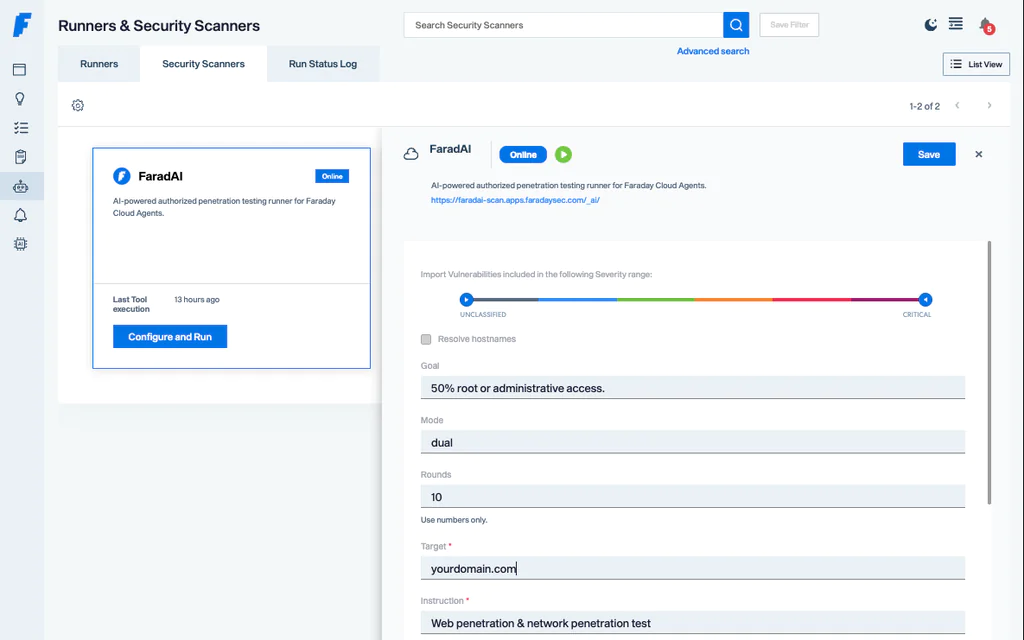
You configure FaradAI once, in Faraday Personal, and everything above just points at it:
- Create your tenant at scan.faradaysec.com.
- Your instance lives at scan.apps.faradaysec.com.
- In Security Scanner, the FaradAI Autonomous Pentest is where you set targets, scope, rounds, and the destination workspace — then trigger it by hand from the UI, or automatically from CI
- To access the FaradAI Dashboard (https://faradai-scan.apps.faradaysec.com/_ai/), you must click FaradAI from the UI. Direct access to the URL is not supported.
Give your AI pentester a home for its findings — Faraday Community · Faraday Personal →