
Scanners have never been the bottleneck. Finding vulnerabilities is the easy part now — an agent can surface more exploitable issues in an afternoon than a team can triage in a week. The bottleneck is everything after the finding: validating it’s real, prioritizing it, and actually fixing it fast enough to hold an SLA while the backlog grows.
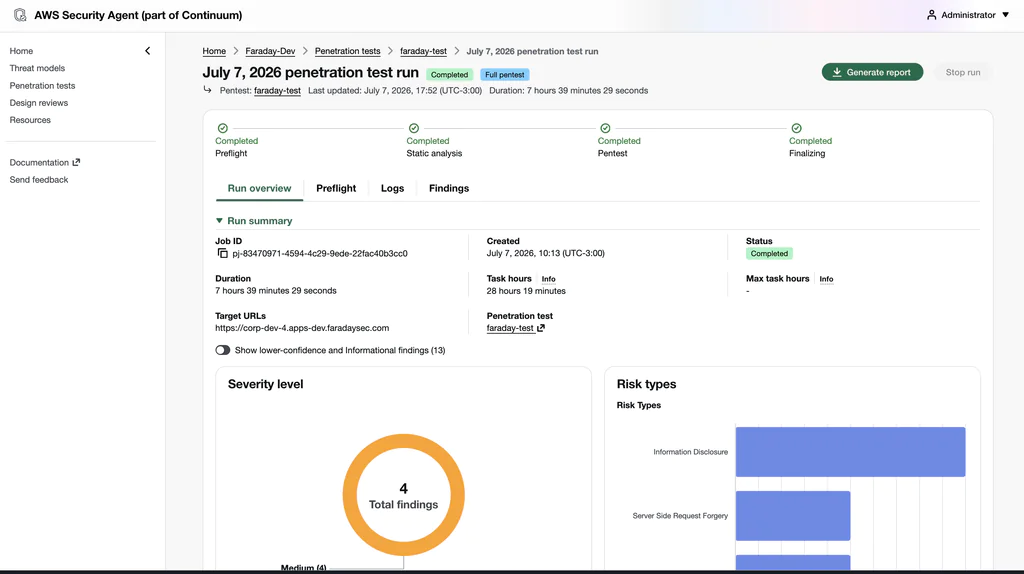
This post is about closing that loop on AWS end to end: AWS’s Security Agent finds it, FaradAI runs its own autonomous pentest and then proves, chains and triages every finding, and AWS Systems Manager patches it — with the prevention steps that stop it coming back. And because AWS Security Agent ships with a 2-month free trial (up to 400 task-hours/month), you can run the entire loop before spending a dollar.
1. Two agentic layers, then a fix
The old model was one scanner throwing a wall of CVEs over the fence. The new model is a pipeline of agents, each doing one thing well:
AWS Security Agent scans the AWS environment
   ↓   findings imported via Faraday's aws_security_agent connector
FaradAI runs its OWN autonomous pentest + validates and chains the Security Agent findings
   ↓   proves real exploitability with working PoCs
FaradAI triage: enrich, dedup, prioritize, SLA-tag — one workspace
   ↓
AWS Systems Manager applies the fix (patch / automation runbook)
   ↓
Prevent: key hygiene, IMDSv2, IaC — so it doesn't regress
Why two offensive layers instead of one? They’re complementary — and they cross-check each other:
| Layer | What it’s good at |
|---|---|
| AWS Security Agent | Native visibility into the AWS environment; surfaces exploitable vulnerabilities with far less noise than a traditional scanner (Inspector/Tenable-style) |
| FaradAI | Runs its own autonomous pentest against the target and takes the Security Agent findings further — chaining them, proving exploitability with working PoCs — then does the triage: enrichment, screenshots, deduplication, consolidation and remediation into one workspace |
The Security Agent tells you what’s wrong on AWS. FaradAI attacks it itself — running an autonomous pentest — and tells you which findings (its own and the Security Agent’s) an attacker can actually use, turning each into a prioritized, evidence-backed, ticketable item.
2. Connect the AWS infra — the right way
Before anything scans, it needs access to the environment. The single most important choice here is how you grant it — because static AWS access keys are one of the most common root causes of real incidents.
- Use an IAM role with temporary credentials, not long-lived access keys. Assume-role / OIDC federation for the scanner and for FaradAI’s runners; no static secrets sitting in a config.
- Scope it tightly — read/enumerate for scanning, and a separate, narrowly-scoped role for the remediation step (more on that below).
- Authorize the scope explicitly. When scanning domains, validate ownership with a DNS record so the activity is clearly authorized — both for your own audit trail and for AWS Trust & Safety when third-party hosts are in play.
3. Pull Security Agent findings in — the connector
You don’t scrape a dashboard or export a CSV. Faraday ships an official aws_security_agent connector (a dispatcher executor) that talks straight to AWS’s Security Agent service — the boto3 securityagent client — and imports its results as Faraday vulnerabilities. It walks the service the way the API is laid out (ListAgentSpaces → ListPentests → ListPentestJobsForPentest → BatchGetFindings + ListDiscoveredEndpoints) and maps each finding, with its riskLevel, into the workspace.
Crucially, it authenticates the way Section 2 argued for: the connector uses the dispatcher’s IAM role by default — you leave the AWS key fields blank and let the container’s role (or STS AssumeRole) supply short-lived credentials. No static access keys anywhere in the loop.
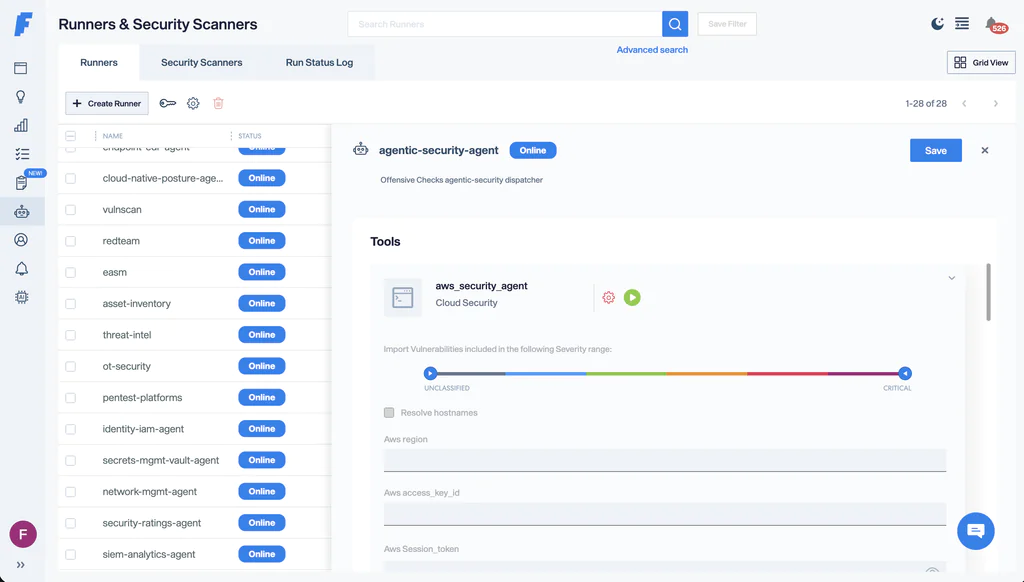
Run it like any Faraday agent:
faraday-cli agent run \
  -a "$DISPATCHER_AGENT_ID" \
  -e aws_security_agent \
  -w aws-prod-<date> \
  -p '{
    "AWS_REGION": "us-east-1",
    "AWS_SECURITY_AGENT_AGENT_SPACE": "as-<uuid>",
    "AWS_SECURITY_AGENT_MODE": "findings,endpoints"
  }'
Leave AWS_SECURITY_AGENT_AGENT_SPACE off to sweep every agent space in the account, or pin AWS_SECURITY_AGENT_PENTEST_ID / _JOB_ID to import one run. The Security Agent’s findings are now Faraday vulns, in a workspace, ready for the next layer.
4. Autonomous pentest + triage with FaradAI
FaradAI runs as a Faraday Security Scanner against the same targets, in two executions — first the pentest, then the triage. Security Scanners are triggered over the REST API with curl (they aren’t driven by faraday-cli); grab each agent’s id from Security Scanners in the UI or GET /_api/v3/cloud_agents.
First execution — the autonomous pentest
It does two things in one pass: an autonomous pentest of its own (recon → attack → chain → prove), and validation of what the Security Agent already surfaced:
curl -sS -X POST "$FARADAY_URL/_api/v3/cloud_agents/$FARADAI_AGENT_ID/run" \
  -H "Authorization: Token $FARADAY_TOKEN" \
  -H "Content-Type: application/json" \
  -d '{
    "args": {
      "TARGET": "<in-scope AWS host / app>",
      "INSTRUCTION": "Run a full autonomous pentest of the target; also validate and chain the Security Agent findings already in the workspace; prove exploitability with working PoCs",
      "MODE": "Dual",
      "ROUNDS": 40,
      "DRY_RUN": false,
      "TIME_LIMIT_SECONDS": 86400
    },
    "workspaces": ["aws-prod-<date>"]
  }' -w "\nHTTP %{http_code}\n"
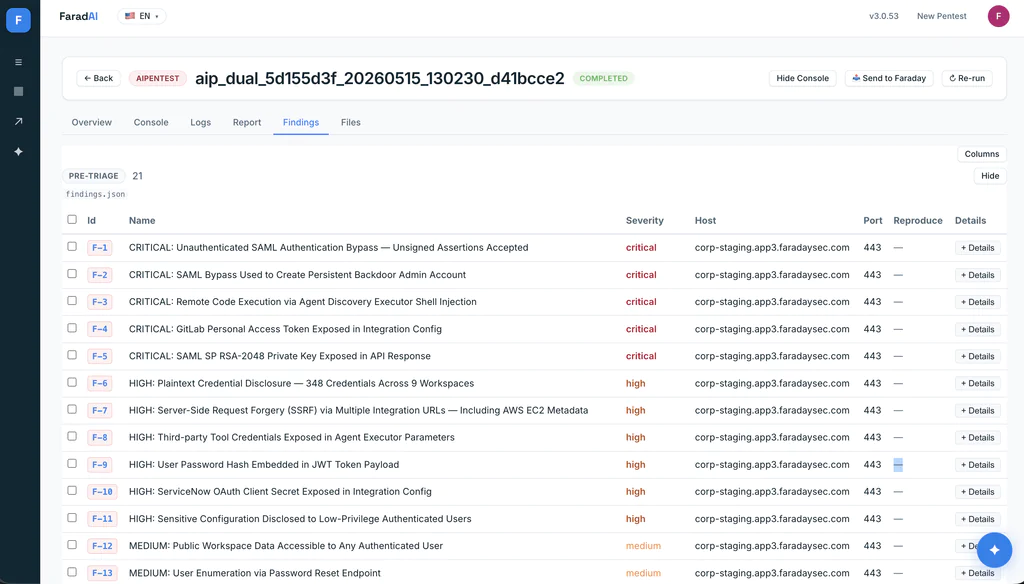
The call is fire-and-forget: it returns immediately (HTTP 200 with a command_id and runner id) while the pentest runs in the background. FaradAI works its rounds — with shared memory across passes and human-in-the-loop steering when you want it — finding new attack paths on its own while corroborating the Security Agent’s, and pushing every proven finding into the workspace.
Second execution — triage the whole workspace
A separate call points FaradAI’s triage Security Scanner at the same workspace, so it enriches, deduplicates and prioritizes everything together — the Security Agent findings and FaradAI’s own pentest results:
curl -sS -X POST "$FARADAY_URL/_api/v3/cloud_agents/$FARADAI_TRIAGE_AGENT_ID/run" \
  -H "Authorization: Token $FARADAY_TOKEN" \
  -H "Content-Type: application/json" \
  -d '{
    "args": {
      "WORKSPACE_NAME": "aws-prod-<date>",
      "MODE": "Dual",
      "PATCHING_MODE": "dry-run"
    },
    "workspaces": ["aws-prod-<date>"]
  }' -w "\nHTTP %{http_code}\n"
WORKSPACE_NAME is what gets triaged. Triage adds screenshot evidence, dedupes across both sources, and ranks by validated exploitability — turning a pile of findings into a prioritized queue of proven issues, each with the evidence a fix owner needs. PATCHING_MODE stays dry-run here because on AWS we apply the actual fix with Systems Manager (next section); flip it to apply only if you want FaradAI itself to drive the remediation.
5. One workspace: next to the DevSecOps findings you already collect
The Security Agent findings and FaradAI’s pentest now live in one workspace — but your team is already producing more: SAST on the source, SCA on dependencies, secret and IaC scanning in CI, CSPM on the account. Those belong in the same place, not in four separate dashboards.
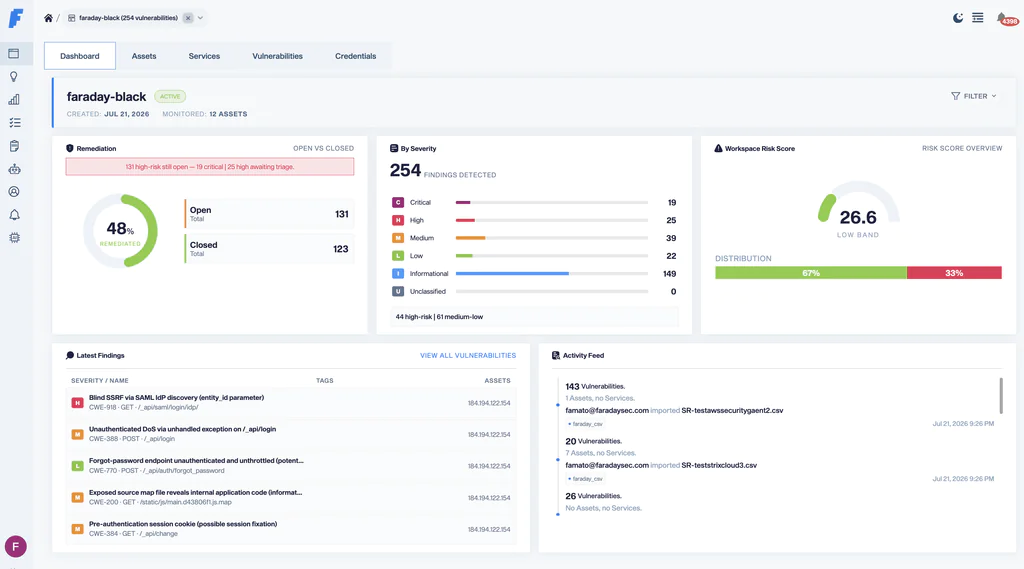
faraday-cli speaks the formats your stack already emits, so import them into the same workspace:
faraday-cli tool report semgrep.sarif  -w aws-prod-<date>   # SAST
faraday-cli tool report trivy.json     -w aws-prod-<date>   # SCA / containers / IaC
faraday-cli tool report gitleaks.json  -w aws-prod-<date>   # secrets
faraday-cli tool report prowler.json   -w aws-prod-<date>   # AWS posture (CSPM)
Now one workspace answers the question no single tool can: of everything we know is wrong — across AWS, the code, and the dependencies — what did an attacker actually prove they could exploit? Prowler flags a hundred posture issues; FaradAI shows which one chained to an IAM-role takeover. The SCA lists forty vulnerable packages; the pentest shows which one was reachable and led to RCE. That correlation — breadth from the scanners, proof from FaradAI and the Security Agent, all deduplicated and prioritized — is what turns a pile of findings into a security program, and it’s what feeds the patch step next.
6. Triage → patch with Systems Manager
This is the step that actually moves the SLA needle. FaradAI’s triage output drives AWS Systems Manager, which already has the reach to change the fleet. Two flavors, matched to the finding type:
OS / package CVEs → Patch Manager. For a vulnerable package on EC2, run the managed patch baseline against the affected instances:
aws ssm send-command \
  --document-name "AWS-RunPatchBaseline" \
  --parameters "Operation=Install" \
  --targets "Key=InstanceIds,Values=i-0abc123,i-0def456"
Misconfigurations → Automation runbooks. For the exposure-class findings FaradAI validates, trigger an SSM Automation document (or a direct API call) that fixes the specific condition:
# Enforce IMDSv2 on an instance that leaked role creds via SSRF
aws ec2 modify-instance-metadata-options \
  --instance-id i-0abc123 --http-tokens required --http-put-response-hop-limit 1

# Block public access on an exposed bucket
aws s3api put-public-access-block --bucket acme-prod-backups \
  --public-access-block-configuration \
  BlockPublicAcls=true,IgnorePublicAcls=true,BlockPublicPolicy=true,RestrictPublicBuckets=true
The remediation role stays separate and minimally scoped, so the thing that finds problems is never the thing that can change production. FaradAI proposes the fix and the evidence; the SSM action applies it against the exact resources named in the finding; a re-scan confirms it’s closed. That’s the automated slice of patching that keeps SLAs intact as volume climbs.
Automate with a guardrail. Auto-apply the safe, well-understood fixes (patch baselines, public-access blocks, IMDSv2); gate the riskier ones behind human approval. The point isn’t to remove people — it’s to stop them being the bottleneck for the obvious 80%.
7. Prevent, don’t just cure
Patching the instance is the cure. Prevention is what stops the same finding reappearing on the next deploy:
- Kill static access keys. Rotate what exists, move to temporary credentials and roles. This is the highest-leverage prevention on AWS, full stop.
- Enforce IMDSv2 at launch (in the launch template / AMI), not just reactively per instance.
- Push the fix into IaC. For anything that came from Terraform or CloudFormation, land the remediation as a pull request so the corrected state is the default next time — cure becomes prevention.
8. Cost — and how to run the whole loop for free
You can prove this entire workflow at zero cost, because AWS Security Agent (on-demand penetration testing) ships with a 2-month free trial for new customers:
- Up to 400 task-hours of pentesting per month, free, for the first 2 months.
- Design reviews (up to 200/month) and code reviews (up to 1,000/month) at no additional cost.
- After the trial — or once you exceed the limit — it’s $50 USD per task-hour.
400 task-hours a month is a lot of runway: more than enough to stand up the vulnerable lab below, run Security Agent + FaradAI’s autonomous pentest + triage + Systems Manager end to end, and tune the loop before you spend anything. FaradAI’s own pentest and triage run on your Faraday instance (Personal), so the AWS trial covers the cloud-side scanning while you validate the full workflow.
(Pricing per AWS as of publication — confirm the current numbers on the AWS Security Agent pricing page before you plan around it.)
Try FaradAI
Everything here — the autonomous pentest, the exploitability validation, the triage — is FaradAI, running inside Faraday. Instead of wiring the flow by hand, let an autonomous offensive agent pentest every target and hand you the prioritized findings in one place.
👉 Meet FaradAI: faradaysec.com/faradai
One place to configure it all: FaradAI
You configure FaradAI once, in Faraday Personal, and everything above just points at it:
- Create your tenant at scan.faradaysec.com.
- Your instance lives at scan.apps.faradaysec.com.
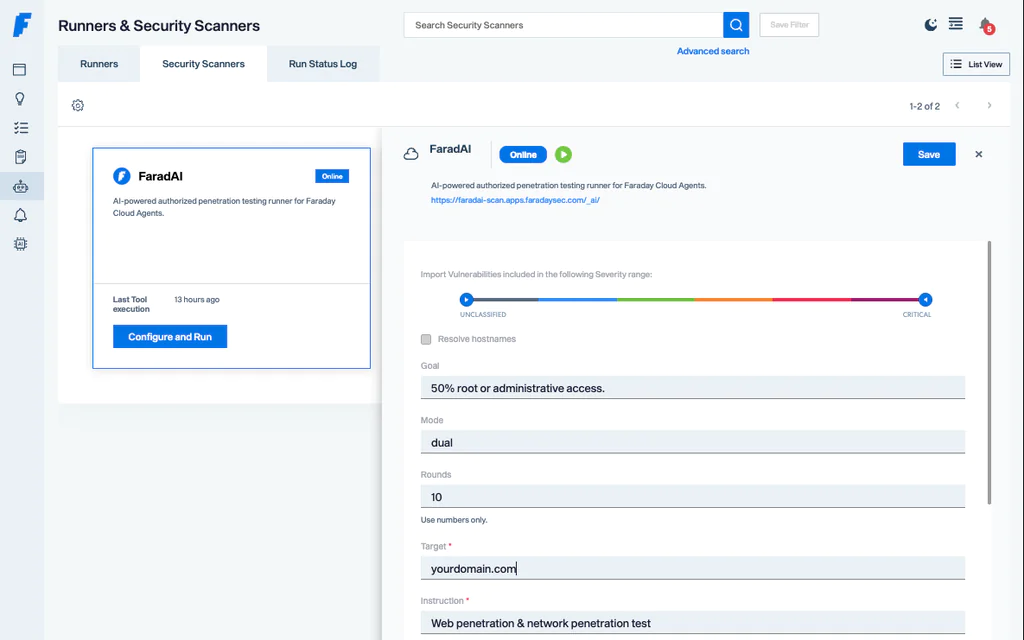
- In Security Scanner, the FaradAI Autonomous Pentest is where you set targets, scope, rounds, and the destination workspace — then trigger it by hand from the UI, or automatically from CI
- To access the FaradAI Dashboard (https://faradai-scan.apps.faradaysec.com/_ai/), you must click FaradAI from the UI. Direct access to the URL is not supported.
Give your AI pentester a home for its findings — Faraday Community · Faraday Personal →