Faraday 5.23 se enfoca en brindar a los equipos de seguridad una forma más clara y personalizable de comunicar el riesgo, al tiempo que continúa perfeccionando los procedimientos de seguridad diarios. Esta versión introduce un nuevo generador de informes ejecutivos, un panel general rediseñado, datos de activos más limpios y consistentes, y un conjunto de mejoras en el flujo de trabajo que eliminan la fricción en las operaciones diarias.
Esto es lo nuevo.
Destacados
- Una nueva forma de elaborar informes ejecutivos
- Un panel general rediseñado
- Datos de activos más limpios y coherentes
- Operaciones diarias más fluidas
Una nueva forma de elaborar informes ejecutivos
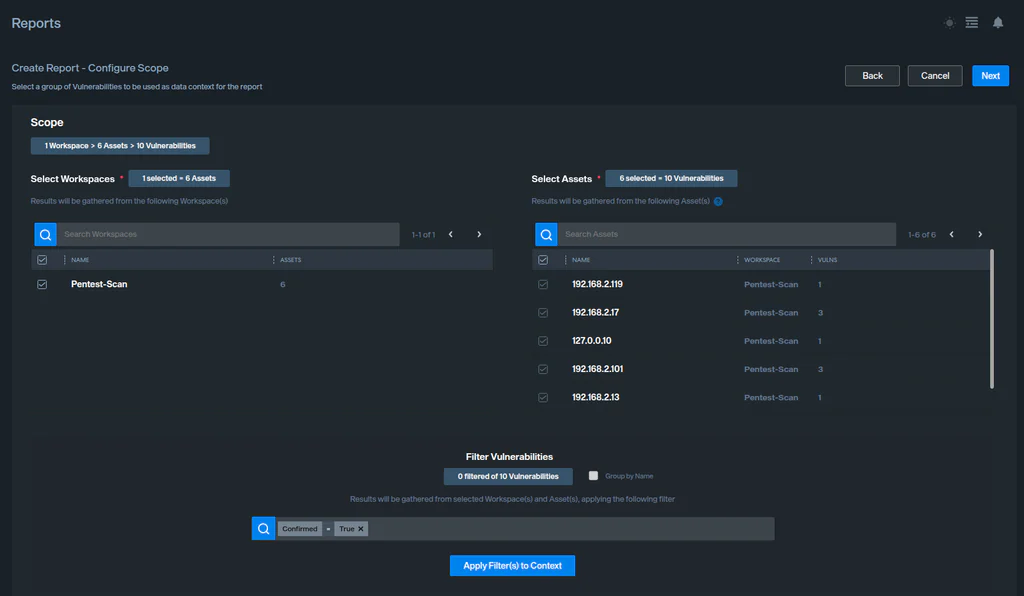
La presentación de informes ejecutivos se renueva por completo. El generador anterior, que producía salidas PDF y DOCX independientes y fijas, se reemplaza por un creador de informes visual y unificado, estructurado en torno a un único flujo de HTML a PDF.
Los informes ahora se componen sección por sección, a partir de una biblioteca de bloques de construcción reutilizables y reordenables:
- Texto enriquecido
- Resumen de gravedad
- Tablas de vulnerabilidades y activos
- Gráficos
- Listas
- Bloques HTML/Jinja personalizados
Para los ciclos de informes recurrentes, las plantillas se pueden guardar y reutilizar, y una nueva acción de “Clonar y actualizar” permite regenerar un informe anterior con datos nuevos en un par de clics, sin necesidad de reconstruirlo desde cero cada vez.
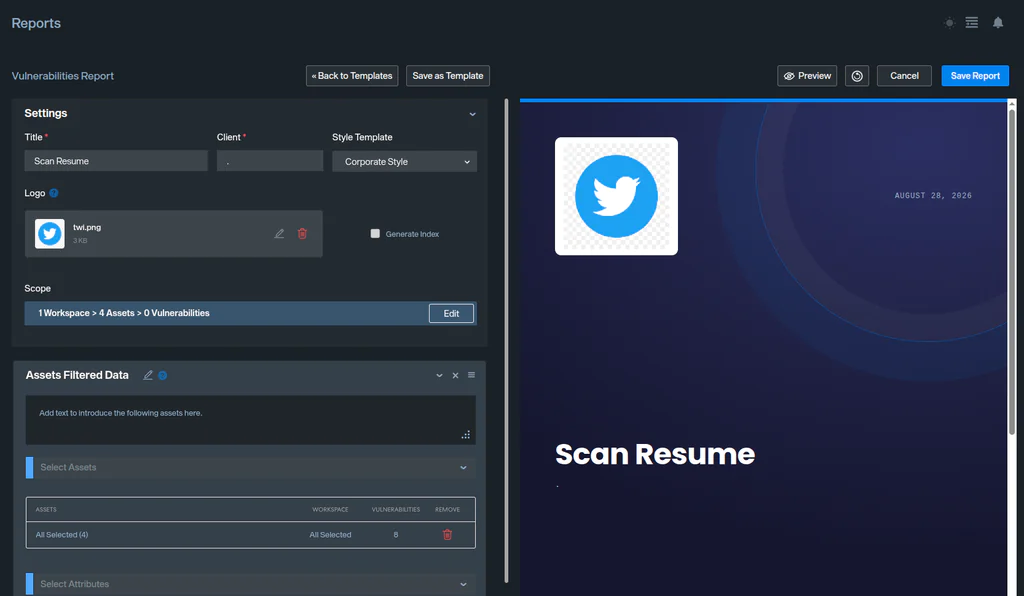
Los informes se pueden exportar a PDF, HTML o CSV, según cómo se vayan a consumir.
El resultado es un flujo de trabajo de informes que se adapta a la forma en que su organización comunica realmente el riesgo, en lugar de obligar a cada audiencia a utilizar la misma plantilla fija.
Documentación: https://docs.faradaysec.com/Executive-Reports/
Un panel general rediseñado
El panel de control predeterminado del espacio de trabajo se ha reconstruido desde cero. El nuevo Panel General incluye cinco widgets, cada uno diseñado para ofrecer a los equipos una visión más rápida de la situación actual:
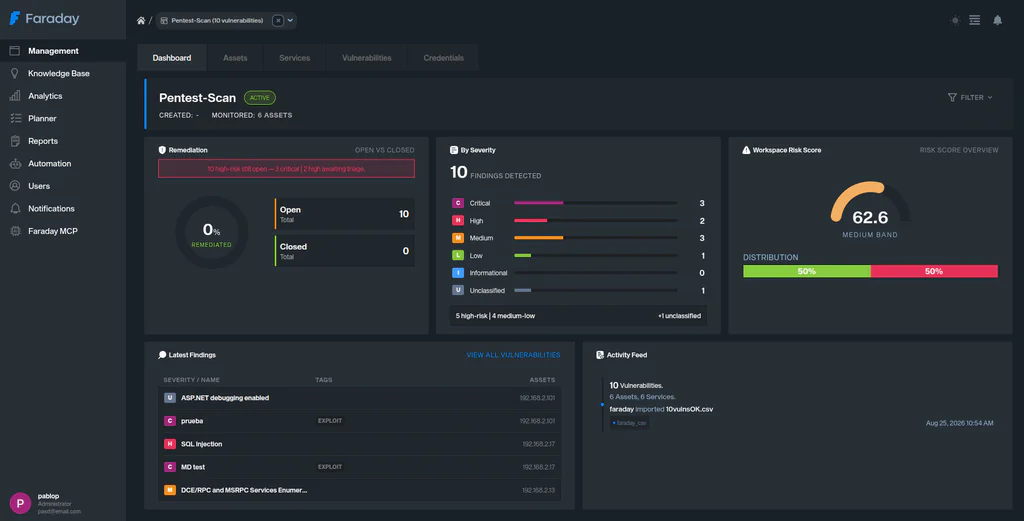
- Remediación — se confirmaron las vulnerabilidades abiertas frente a las cerradas.
- Por gravedad — hallazgos confirmados abiertos/reabiertos por gravedad, con filtros para confirmados/no confirmados y cerrados/no cerrados.
- Riesgo en el lugar de trabajo — el sucesor de Average Risk.
- Últimos descubrimientos — confirmados, hallazgos abiertos/reabiertos, ordenados por gravedad.
- Registro de actividad — ahora también refleja las cargas realizadas a través de la interfaz de usuario, no solo las importaciones programáticas.
Los widgets se pueden agregar, quitar, redimensionar y reorganizar, y el diseño que elija persiste por usuario, de modo que cada analista puede adaptar el panel a su forma de trabajar.
Datos de activos más limpios y coherentes
La tabla de Activos y la vista de detalles se han normalizado para que los mismos campos se comporten de la misma manera en todas partes, tanto en el nivel superior como dentro de un espacio de trabajo. La búsqueda, el selector de columnas y la vista de detalles ahora exponen de manera consistente Comando, Hora de creación, Descripción, Importancia, Dirección MAC, Propietario, Parámetros, Etiquetas, Vulnerabilidades y Puntuación de riesgo total.
Esto conlleva algunos cambios de nombres y de estructura:
- La columna de Activos ya está Nombre.
- Propietario reemplaza la etiqueta de Usuario en los detalles del activo.
- Puntuación de riesgo renombrada Puntuación de riesgo total.
- Open Services se elimina del selector de tablas y columnas, reemplazado por un sistema dedicado Servicios tabla (nombre, puerto, estado) dentro de los detalles del activo.
El resultado son datos de activos más fáciles de buscar, comparar y sobre los cuales informar, con menos incoherencias entre las vistas.
Operaciones diarias más fluidas
Un conjunto de mejoras en el flujo de trabajo se ha incluido en esta versión para reducir la fricción en el uso diario:
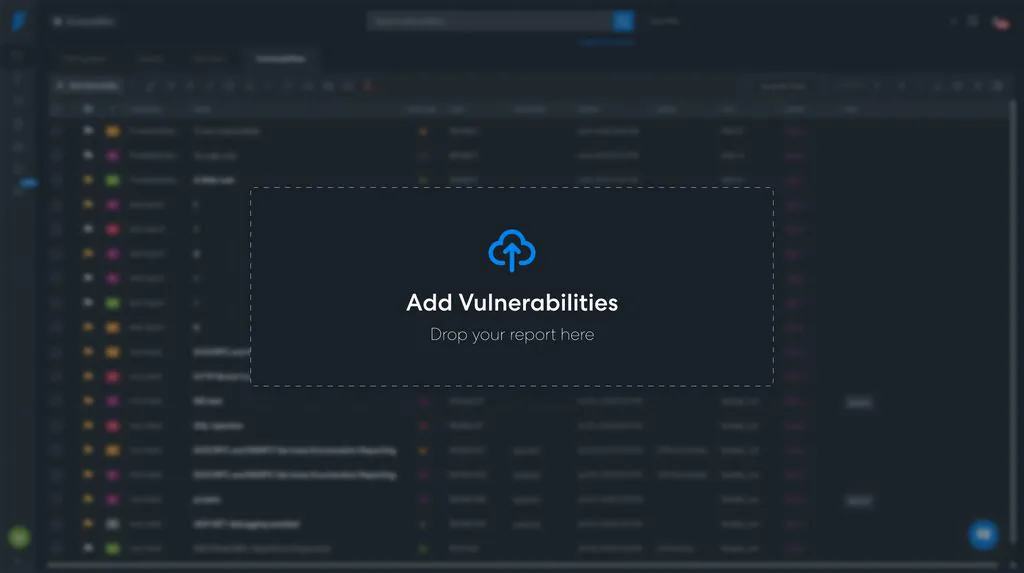
- Los informes de vulnerabilidad ahora se pueden importar soltando archivos directamente en las secciones del panel y de gestión, con retroalimentación de arrastre.
- Un nuevo botón de descarga de CSV en la tabla general de vulnerabilidades exporta “tal como se ve, tal como se obtiene”: los filtros actuales de la barra de búsqueda y las columnas configuradas, exactamente como se muestran.
- La vista de Ejecutores y Escáneres de Seguridad ahora incluye una barra de búsqueda que filtra por estado, fecha de última ejecución, última herramienta de ejecución, herramientas, categoría y bloqueado, con un texto de marcador de posición contextual según la pestaña activa.
- El avatar del usuario se ha movido de la barra de navegación a la barra lateral, y el selector de tema del menú a la barra de navegación; se mantienen las mismas opciones desplegables y el mismo comportamiento.
- Los roles de usuario SAML ahora se resincronizan a partir de la aserción en cada inicio de sesión, en lugar de solo al crear el usuario.
- Todas las sesiones activas se invalidan ahora tras un cambio de contraseña exitoso, lo que obliga a volver a autenticarse.
Junto con estos, se implementó una amplia ronda de correcciones de errores en Runners, la Base de Conocimiento, las notificaciones de SLA, la búsqueda de credenciales y más; la lista completa se encuentra en el registro de cambios a continuación.
Actualizar a Faraday 5.23
Faraday 5.23 ofrece una forma más flexible de crear informes ejecutivos, un panel que destaca lo que importa más rápido, datos de activos más limpios en general y una serie de correcciones que facilitan las operaciones diarias.
Ya sea que su equipo esté preparando informes para las partes interesadas, haciendo un seguimiento de los riesgos de un vistazo o gestionando grandes inventarios de activos, esta versión ofrece mejoras concretas que le ayudan a trabajar más rápido y a comunicar los riesgos con mayor claridad.
Para ver la lista completa de cambios incluidos en esta versión, consulte el registro de cambios de la versión.
Mirando hacia adelante
Faraday continúa evolucionando con un objetivo en mente: ayudar a los equipos de seguridad a dedicar menos tiempo a gestionar datos de vulnerabilidades y más tiempo a reducir los riesgos reales.
Tus comentarios continúan dando forma a nuestra hoja de ruta. Si tienes preguntas, sugerencias o solicitudes de funciones, contáctanos en support@faradaysec.com.
¡Nos vemos en la próxima versión!